
If you have taken a closer look at your Google Search Console in recent weeks, you might have noticed a new item: Under Settings, in the Shopping section, the "Shipping and Returns" option has appeared. This is a practical feature for online retailers. You can store your shipping and return policies directly in Search Console, without any Merchant Center and without a single line of code. Delivery time, shipping costs, and return period end up exactly where Google needs them for your product listings.
We will show you what the setting can do, how to fill it out step-by-step, and what you should pay attention to.
What's Behind the New Google "Shipping and Returns" Feature
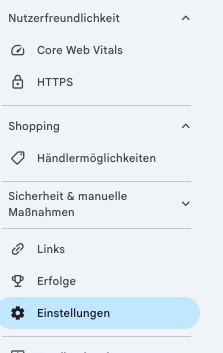
The setting is part of the Shopping section in Search Console. As soon as Google programmatically classifies your website as an online retailer, Search Console displays additional tools, including the "Merchant listings" report and the "Shipping and Returns" setting. An online retailer is defined as a website that sells physical goods directly to end customers. In practice, Google primarily recognizes shops by valid structured data for merchant listings and the site's purchasing process.
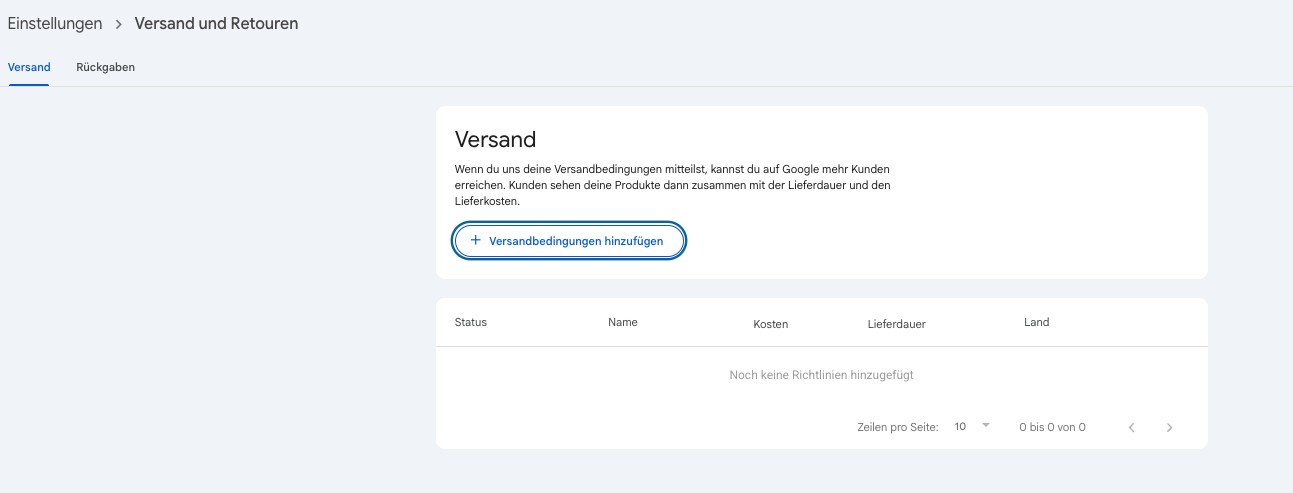
You can find the feature under Settings (gear icon) in the Shopping section. A click on "Shipping and Returns" opens the overview. As long as nothing has been entered, you will see the counter "0 shipping policy, 0 return policies" here.

The area is divided into two tabs: "Shipping" and "Returns". Both work on the same principle but differ in the fields you fill out.
Why Google Is Now Rolling Out This Feature Widely
The setting is not entirely new, but it has just become accessible to significantly more shops. A brief look at the chronology helps to put it into perspective:
July 2024, the start: Google introduced the direct configuration of shipping and returns in Search Console. At that time, the feature was tied to a linked Merchant Center account.
November 2025, the expansion: Google extended the feature to all websites recognized as online retailers. A Merchant Center account has not been mandatory since then. In parallel, Google introduced structured data for shipping policies at the organization level, as an alternative for those who prefer to maintain their information in the code.
Google itself describes the Search Console version as a user interface-based way to share shipping and return information, explicitly as an alternative to structured data. The rollout is gradual for all countries and languages, which is why the setting is only gradually becoming visible in German accounts. This explains why it may already appear in some of your properties and not yet in others.
Creating Shipping Policies: Here's How!
In the "Shipping" tab, you store how quickly and at what cost you deliver. If no policy exists yet, the process starts with the "Add shipping policy" button.
The form then requests the essential information:
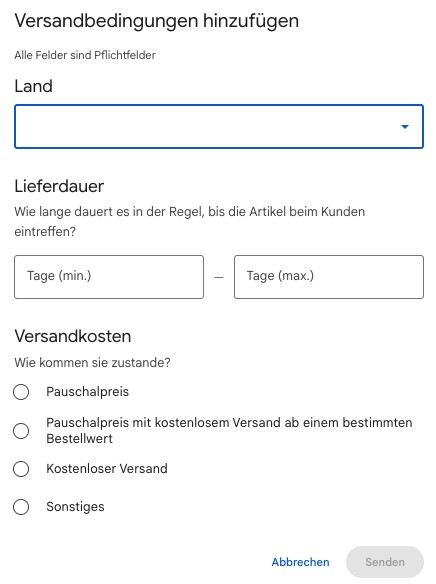
Country: Select the country for which the policy applies. You create a separate policy for each additional country.
Delivery time: Enter how long it typically takes for the goods to reach the customer. Google asks for a minimum and maximum number of days here.
Shipping costs: The options are a flat rate, a flat rate with free shipping above a certain order value, free shipping, or the "Other" option.
After clicking "Submit", the entry is complete. Repeat the process for each country you ship to.
Creating Return Policies: Step by Step
The "Returns" tab follows the same logic. You open the corresponding form via "Add return policy".
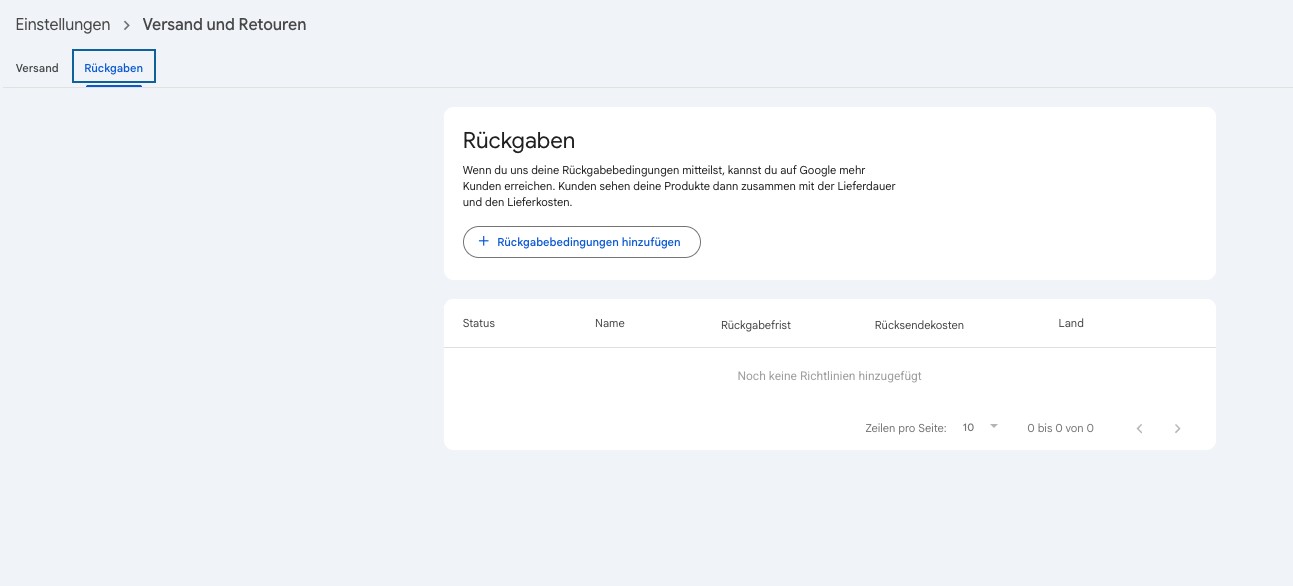
This information is requested:
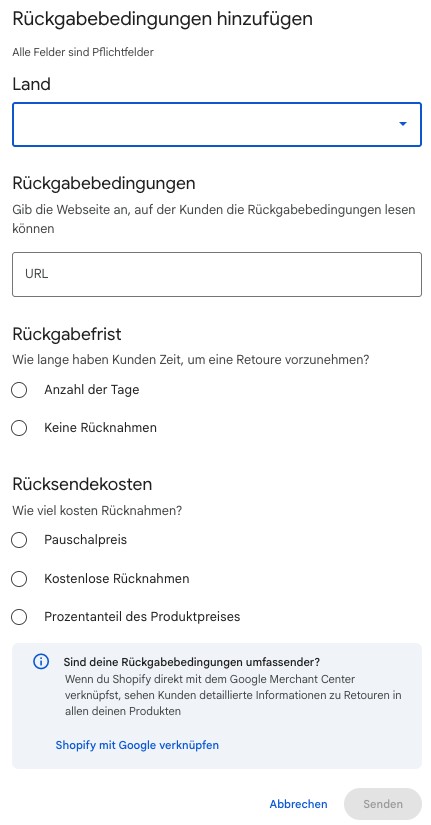
Country: country-specific, just like with shipping.
Return policy (URL): Here you enter the web address where your customers can read the full return policy. This page should be clear and stand-alone.
Return period: Specify within how many days customers can return items, or select "No returns".
Return shipping costs: Options include a flat rate, free returns, or a percentage of the product price.
An important difference from shipping: While shipping information is applied immediately, Google reviews return policies manually. According to Google, it can take around 10 to 13 days for approval. During this time, the policy will have a "pending" status. So, plan for this lead time, especially before high-revenue periods like the Christmas season.
Linking Shopify with Google: More Details on Returns
In the return form, Google displays a note: If your return policies are more comprehensive, you can link Shopify directly to the Google Merchant Center. According to Google, the advantage is that customers will then see more detailed information about returns across all your products.
This connection is made via the Google & YouTube app in the Shopify admin area. You first set up your return rules in Shopify and maintain the written return and refund policy. The policies are then managed in Merchant Center. For pure Shopify stores, this is the more direct route because return policies can be controlled more granularly there, for example, per product group or with seasonal exceptions. Those who want to take this path can get started on the official Shopify page for Google integration (shopify.com/de/google).
For all other shops, direct entry in Search Console remains the fastest solution for submitting shipping and return information to Google in the first place.
Approval, Precedence, and Interaction with Merchant Center
There are two technical points you should know before you start.
Precedence over structured data: According to Google, what you configure in Search Console takes precedence over the structured data on your website, including the merchant listing markup at the product level. Therefore, if you use markup and enter different values in Search Console simultaneously, the Search Console entry will win. You should therefore check that both sources list the same figures, otherwise you might overwrite your own settings.
Transition to Merchant Center: If you have a Merchant Center account, you must link it to the property. Policies created in Search Console will then automatically appear in Merchant Center and can be further refined there. Merchant Center offers additional signals that are missing in Search Console, for example, the return method (such as in-store return) or seasonal exceptions. Conversely, policies that you edit in Merchant Center can subsequently only be maintained there.
What the Setting Means for Your SEO
The real leverage lies in the presentation of your products in search. Correct shipping and return information can ensure that your listings are displayed with additional info like free or fast shipping. Google names product search results, Knowledge Panels, and brand profiles as possible placements, among others. For users, these are precisely the signals that build trust and facilitate the purchasing decision, which can result in better visibility and potentially more qualified traffic.
For this to work, Google recommends a few basic rules, which we can only emphasize from our practical experience:
Consistency between Google and your website: The shipping costs stored with Google must exactly match the costs on your website. If Google finds higher shipping costs on your site than in the listing, the listing may be rejected.
Dedicated URL for returns: Place the return policy on a clear, stand-alone page, not hidden in FAQs, Terms and Conditions, or the Privacy Policy.
Consistent presentation: The return information should be consistent everywhere on the website, i.e., in the footer, on the return page, and in banners.
Keep it updated: Review your information regularly to ensure it corresponds to the actual conditions and does not cause confusion.
Frequently Asked Questions about Shipping and Returns in Search Console
Do you have questions? We have the answers!
Do I need a Merchant Center account to use the setting?
No. Since the expansion in November 2025, all websites recognized by Google as online retailers can create the policies directly in Search Console. However, you must link an existing Merchant Center account to the property.
Why don't I see the setting in my Search Console?
Two reasons are likely. Either Google does not yet classify your website as an online retailer, which is often due to missing or incomplete structured data for products. Or the gradual rollout has simply not reached your account yet.
How long does approval take?
Shipping policies are applied immediately. Google reviews return policies manually, which can take around 10 to 13 days. The policy will have a "pending" status during this time.
Who can edit the setting?
You must be an owner or a full user of the respective Search Console property.
What happens if I already have markup on my website?
The information from Search Console takes precedence over the markup at the product level. Make sure that both sources contain the same values.
A Small Step in Search Console, a Noticeable Effect in Search
The "Shipping and Returns" setting makes it easier than ever for online retailers to provide Google with correct fulfillment information. Without Merchant Center, without code, in just a few minutes per country. Those who maintain the information cleanly and keep it consistent with their own website will no longer miss out on valuable trust signals in the search results.
Do you want to know if your shop is already recognized by Google as an online retailer and how to optimally set up your product data? We will look at your Search Console together and derive concrete next steps from it. Contact us for a non-binding consultation!